TEC-IT barcode software
Key facts
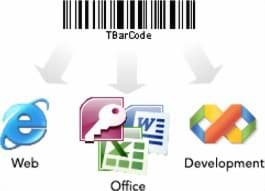
TEC-IT develops barcode generation software for different environments. The Barcode Software SDK (TBarCode SDK) is aimed at software development: it provides barcodes as a .NET assembly, ActiveX control and DLL, calculates check digits automatically and outputs barcodes as image files, PDF or PCL or via a callback interface, for example for laser engraving. For Linux, UNIX and macOS, the shop lists the TBarCode/X variant.
The barcode DLL for ERP printing works in the ERP system’s print path: it extends the spool transfer service on Windows print servers and front-end printing at the workstation. According to the manufacturer, barcodes are generated in the software and sent via the Windows printer driver to local and network printers, without barcode fonts or additional hardware. The Office add-in brings barcode generation to Word and Excel, with mail merge and links to Excel cells.
- Your own applications, web applications and reports that should generate barcodes themselves (SDK)
- Delivery notes, labels and forms from the ERP system with barcodes on existing Windows printers
- Mail merge letters, lists and stocktaking sheets with barcodes in Word and Excel
- Environments without barcode fonts or printer-side barcode extensions
- Designing labels graphically and managing templates centrally: BarTender or Loftware NiceLabel
- Host applications on mobile devices: Ivanti Velocity
- Central label management with printing from the ERP as a supported solution: OPAL Labelmanagement™
Detailed specifications
| Barcode Software SDK | Barcode DLL for ERP printing | Office add-in | |
|---|---|---|---|
| Manufacturer product name | TBarCode SDK | TBarCode/SAPwin (in the shop: Barcode DLL für SAPSprint und SAPGUI) | TBarCode Office |
| Version (manufacturer) | not specified (runtime note from TBarCode 11.15) | V11.0.0 | V11.0.0 |
| Use | Barcodes in your own applications via programming | Barcode printing from the ERP system via the Windows printer driver | Barcodes directly in Word and Excel |
| Components and interfaces | .NET assembly (class, WinForms, ASP.NET WebForms), ActiveX control (OCX), DLL | Extension for SAPSprint (spool transfer program) and SAPGUI for Windows (front-end printing); SAPlpd no longer supported from V11 | Word add-in and Excel add-in |
| Environment | C/C++, C#, VB.NET, VB, VBA, Delphi, ASP.NET, ASP, JavaScript, VBScript and others (shop) | SAPscript, Smart Forms, ABAP, WWI (SAP EH&S); SAP ERP, R/3, mySAP ERP | Microsoft Office 2007, 2010, 2013, 2016, 2019 and Office 365 (according to the manufacturer) |
| Operating system | Windows 32 and 64-bit with one DLL; Linux, UNIX, macOS via TBarCode/X (shop) | Windows clients and Windows print servers, x32 and x64 | not specified |
| Symbologies | Over 100: linear, 2D, GS1, postal (according to the manufacturer) | Common linear and 2D codes, including Code 39, Code 128, EAN, PDF417, Data Matrix, QR Code, GS1 DataBar | Over 100: linear, 2D, GS1, postal (according to the manufacturer) |
| Output | BMP, GIF, JPG, TIF, PNG, EPS, PCL, EMF, WMF, PDF (shop), SVG (manufacturer) | Local and network printers via the Windows printer driver | In the document; printing without barcode fonts |
| Special features | Automatic check digits, callback API for custom output, e.g. laser engraving or DPM | No printer extensions, barcode fonts or barcode printers required | Mail merge with barcodes, links to Excel cells, convert cells and columns into barcodes with one click |
| Scope of delivery | not specified | x32 and x64 versions, installed in the SAPSprint or SAPGUI directory | Word and Excel add-ins together |
| Licensing model (manufacturer) | One-time perpetual licence: Single (1 installation), Site (up to 250), Developer (redistribution, up to 10,000), Web (server, up to 10,000 users); 1D or 2D each | Site: one-time, up to 10 printers; Server: annual subscription for all printers on a print server; Enterprise: annual subscription, worldwide; all barcode types each | Annual subscription: Single (1 installation) or Enterprise (worldwide); 1D and 2D each |
| Subscription terms (manufacturer) | not applicable | not specified | Automatic renewal for 12 months, cancellation up to 3 months before the end of the term; updates and standard support included |
| Variants in the shop | 1D codes only or 1D and 2D codes | same as left | 1 user or site licence; 1D only or 1D and 2D |
Source: manufacturer data sheets and product pages, as of October 2026. Subject to change; individual variants may differ. Prices and delivery times are available in the shop.
Variants and accessories
| Shop item | Licence in the shop | Barcode types |
|---|---|---|
| Barcode Software SDK | not specified | 1D only or 1D and 2D |
| Barcode DLL for ERP printing | not specified | 1D only or 1D and 2D |
| Office add-in for Word and Excel | 1 user or site licence | 1D only or 1D and 2D |
Add-ons
- Printers for barcode printing: label printers
- Labels and consumables: labels
- Central label solution for the ERP system: OPAL Labelmanagement™
- Set-up and connection to your systems: integration
Barcode software or label software?
| TEC-IT barcode software | Label software (BarTender, NiceLabel) | |
|---|---|---|
| Approach | Barcodes in existing applications, forms and documents | Dedicated label templates with a graphical designer |
| Design | In the existing form, report or document | In the software’s label designer |
| Printing from the ERP | Barcode DLL in the print path, form stays in the ERP system | Data from the ERP via interfaces, template in the label software |
| Printers | Printers with a Windows driver, without barcode fonts | Drivers for label and office printers |
| Central template management | Handled by the ERP system or application | BarTender Enterprise or NiceLabel ControlCenter |
| Licence (manufacturer) | SDK one-time; barcode DLL one-time (Site) or annual subscription; Office add-in annual subscription | Subscription or licence by number of printers |
The TEC-IT products add barcodes to existing applications. This is a good fit if your forms are already maintained in the ERP system or in Office and only the barcode is missing. Label software, by contrast, offers dedicated label templates, print screens for production and central template management. Go to BarTender or go to Loftware NiceLabel
What OPAL adds
Frequently asked questions
Do I need special printers or fonts for barcodes from the ERP?
According to the manufacturer, no. The barcode DLL generates the barcodes and sends them via the Windows printer driver to local or network printers. Printer extensions, barcode fonts or special barcode printers are not required.
In which ERP documents do the barcodes work?
According to the manufacturer, in all documents created with the ERP system’s form tools, including lists and templates of the environment, health and safety module. The prerequisite is printing via a Windows print server or as front-end printing at a Windows workstation. The exact form technologies are listed in the technical table.
What do the 1D and 2D variants mean?
For the SDK, according to the manufacturer the 1D licence covers linear codes only, while the 2D licence covers all codes including linear ones. If you need Data Matrix or QR Code, choose the 2D variant. For the barcode DLL and Office add-in, the manufacturer lists licences with all barcode types; we will clarify with you which shop variant is suitable.
Which Office versions does the add-in support?
According to the manufacturer, Microsoft Office 2007, 2010, 2013, 2016, 2019 and Office 365. The shop item title only mentions 2007 to 2013. The Word and Excel add-ins are included together.
Can I use the SDK on Linux as well?
According to the manufacturer, the Windows DLL covers 32 and 64-bit. For Linux, UNIX and macOS, the shop lists the TBarCode/X variant. The manufacturer also offers source code licences for various processor architectures.
Am I buying a licence or a subscription?
That depends on the product. According to the manufacturer, the SDK is a one-time perpetual licence, and the barcode DLL is available as a one-time Site licence or as an annual subscription. The Office add-in runs as an annual subscription and renews automatically for 12 months unless you cancel up to 3 months before the end of the term.
Data sheets and manufacturer information
The manufacturer provides data sheets, user guides and configuration guides on the product page. We are also happy to send you the documents directly.