


Card printers for ID, visitor and access cards
Our card printer series
Each series has its own page with specifications, variants, comparison and frequently asked questions. You will find prices and availability in the shop.
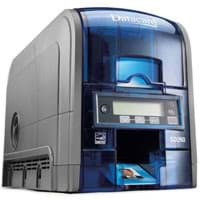
Which card printer suits which application?
| Application | What matters | Suitable series |
|---|---|---|
| Single-sided employee badges in small quantities | Simple operation, colour printing with photo, 30 mil cards | Zebra ZC100, Entrust SD260 |
| Dual-sided badges | Automatic card turning, ribbons for dual-sided printing | Zebra ZC300 / ZC350, Entrust SD360 |
| Access and time recording cards with magnetic stripe | ISO 7811 encoder, HiCo or LoCo to match the reader system | Zebra ZC series, Entrust SD series |
| Smart cards (MIFARE, contact) and UHF cards | Encoder for the card technology of your access system, field upgradeable | Zebra ZC350 |
| Network printing from several workstations | Ethernet or Wi-Fi, drivers for Windows, Linux or macOS | Zebra ZC series |
| Keeping an existing SD installation running | Same ribbons and cards, check driver support | Entrust SD260 / SD360 |
| Tamper-resistant badges, printing over the card edge | Retransfer printing, lamination, security features | Request advice |
The series compared
| Series | Printing | Colour single-sided | Encoding | Interfaces | Operating systems per datasheet |
|---|---|---|---|---|---|
| Zebra ZC100 / ZC300 / ZC350 | ZC100 single-sided, ZC300 and ZC350 single or dual-sided | 150 to 225 cards/h depending on model | Magnetic stripe; ZC350 also contact, MIFARE and UHF | USB 2.0, Ethernet, optional Wi-Fi | Windows, Ubuntu, macOS |
| Entrust SD260 / SD360 | SD260 single-sided, SD360 single and dual-sided | up to 200 cards/h | Magnetic stripe; contact and contactless (iCLASS) as an option | USB 2.0, Ethernet | Windows up to Windows 7 |
Speeds according to the manufacturer for single-sided colour printing (YMCKO for Zebra, YMCKT for Entrust). Entrust no longer lists the SD series on its current product page.
Source: manufacturer data sheets and product pages, as of October 2026. Subject to change; individual variants may differ. Prices and delivery times are available in the shop.
What to know before you buy
Direct-to-card or retransfer?
With direct-to-card printing, the printhead transfers the colour by dye sublimation directly onto the card surface. The method is fast, economical in consumables and well suited to smooth PVC cards. With retransfer printing, the printer first prints the image onto a transfer film and then fuses it onto the card with heat. This produces an image over the card edge, covers unevenness above chips or antennas and gives a more durable surface. Retransfer is slower and more expensive in consumables. Our Zebra and Entrust series use direct-to-card printing; we will advise you on retransfer printers.
Single or dual-sided printing?
Many badges only need a printed front with photo, name and logo. You can use the back for instructions, an emergency number, a barcode or a signature field. Dual-sided printers turn the card with a flipper and print both sides in one pass, using ribbons with a second black panel such as YMCKOK or YMCKT-K. Turning cards by hand is possible for small quantities but takes time and leads to misprints more easily. According to the manufacturer, the card flipper can be retrofitted on the Zebra ZC300.
Magnetic stripe, contact chip or contactless?
The encoding you need is determined by your access control, time recording or payment system. Magnetic stripes to ISO 7811 come as HiCo with high coercivity, which is less sensitive to magnetic fields and suits frequently used cards, and as LoCo, which is easier to encode but more sensitive. Contact chips to ISO 7816 are used, for example, for PC login or signatures. Contactless cards to ISO 14443, such as MIFARE or iCLASS, are common in access control, while UHF cards to EPC Gen 2 allow longer read distances. You can find more on radio technology under RFID.
CR80 card format and card thickness in mil
Badges almost always use the CR80 format to ISO/IEC 7810 ID-1, measuring 85.6 × 53.98 mm, the size of a bank card. Thickness is given in mil; one mil is a thousandth of an inch or 0.0254 mm. 30 mil (0.76 mm) is usual for badges, while thin 10 mil cards are suitable, for example, as adhesive cards. In the shop we stock white Zebra PVC cards in 10 mil and 30 mil, the 30 mil cards also with HiCo or LoCo magnetic stripe, and 10 mil PVC adhesive cards, each in packs of 500 cards. Check before buying which card thicknesses your printer handles.
Ribbons: what does YMCKO mean?
The letters stand for the panels on the ribbon: Y, M and C (yellow, magenta, cyan) create the colour image by dye sublimation, K is black resin for sharp text and barcodes, and O is a transparent protective overlay (T for topcoat at Entrust). YMCKOK has a second black panel for the back. Ribbons with half-size colour panels (½ YMCKO) print colour on part of the card only and last for more cards. Monochrome ribbons print a single colour and produce considerably more cards per roll. The term images refers to printed card sides. According to the manufacturer, Zebra ZC series printers only work with genuine ribbons.
Security and data protection in badge printing
Badges open doors, so printers, blank cards and data must be protected. Current printers encrypt print data, authenticate printer and computer mutually and have a lock for the card hopper. Photos and names are personal data: restrict access to badge software and print jobs to authorised persons. Used ribbons with colour panels contain a negative of every printed card, so dispose of them like confidential documents. You can read how to secure printers on the network under Cybersecurity.
What OPAL adds
Frequently asked questions
Which software do I need for badge printing?
Alongside the printer driver, you need badge software in which you design the card layout and take the data from a database or list. In the shop we offer CardFive Vision for this. We set up the connection to your HR or access control system with you; find out more under Integration.
How many cards does a ribbon print?
That depends on the ribbon type. According to the manufacturers, YMCKO ribbons from Zebra last for 200 or 300 images and YMCKT ribbons from Entrust for 250 or 500 images. Monochrome ribbons manage 1,500 to 2,000 images. One image corresponds to one printed card side.
Do I need a dual-sided card printer?
Only if the back is to be printed individually on a regular basis, for example with a barcode, emergency number or instructions. A single-sided printer is sufficient for front-only badges. If you are unsure: according to the manufacturer, the card flipper can be retrofitted on the Zebra ZC300.
Can I print on cards with a chip?
Many chip card blanks can be printed using direct-to-card printing. The area above a contact chip stays blank, and unevenness caused by embedded antennas can affect the print. If print quality is critical, retransfer printing is the better choice. We check with you which cards suit your printer.
Can I upgrade the printer later?
On many models, yes. According to the manufacturers, the magnetic stripe encoder can be retrofitted on the Entrust SD260 and SD360, the card flipper on the Zebra ZC300 and chip and UHF encoding on the ZC350. According to Zebra, some upgrade kits may only be installed by a trained partner; we take care of this for you.