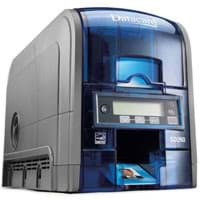
Zebra ZC100, ZC300 and ZC350
Key facts
The ZC series is Zebra's family of direct-to-card printers for ID, membership and access cards. All three models print at 300 dpi using dye sublimation on CR80 cards, use ribbon cartridges and connect via USB, Ethernet and optional Wi-Fi. According to Zebra, the ZC100 replaces the ZXP Series 1 and the ZC300 replaces the ZXP Series 3.
The models differ in speed, operation and encoding. The ZC100 prints one side only and shows its status via LEDs. The ZC300 has a graphical colour display, Ethernet as standard and comes in single or dual-sided versions. The ZC350 adds encoding of contact, contactless and UHF cards as well as speciality ribbons, for example with a watermark or metallic effect. We will gladly advise you on the right configuration.
- Employee and visitor badges with photo, single or dual-sided
- Access cards with magnetic stripe, MIFARE chip or UHF inlay (ZC350)
- Badge printing on the network via Ethernet or Wi-Fi
- Environments with Windows, Linux (Ubuntu) or macOS
- Replacing Zebra ZXP Series 1 and ZXP Series 3
- Existing Entrust SD installations that should keep running with the consumables in stock: Entrust SD260 and SD360
- A used entry-level printer with dual-sided printing: Entrust SD360
- Retransfer printing over the card edge or large volumes in continuous operation: talk to us
Detailed specifications
| ZC100 | ZC300 | ZC350 | |
|---|---|---|---|
| Print method | Direct-to-card, dye sublimation (thermal transfer) | same as left | same as left |
| Printing | single-sided | single or dual-sided (dual-sided model) | same as left |
| Resolution | 300 dpi (11.8 dots/mm) | same as left | same as left |
| Colour single-sided (YMCKO) | up to 150 cards/h | up to 200 cards/h | up to 225 cards/h |
| Colour dual-sided (YMCKOK) | not available | up to 140 cards/h | up to 150 cards/h |
| Monochrome single-sided | up to 700 cards/h | up to 900 cards/h | up to 1,000 cards/h |
| Cards | CR80 (ISO 7810 ID-1) and CR79, 10 to 40 mil; 100-card input and output (30 mil) | same as left | same as left |
| Magnetic stripe | ISO 7811, tracks 1 to 3, optional | ISO 7811, tracks 1 to 3, HiCo and LoCo, field upgradeable | ISO 7811, tracks 1 to 3 |
| Chip encoding | not specified | not specified in the datasheet | contact ISO 7816 (EMV Level 1), contactless MIFARE ISO 14443 A/B with SAM slot, UHF EPC Gen 2, field upgradeable |
| Interfaces | USB 2.0; Ethernet 10/100 and 802.11ac Wi-Fi optional | USB 2.0, Ethernet 10/100; 802.11ac Wi-Fi optional | same as left |
| Operation | 3 status LEDs, illuminated single-card feed | graphical colour display | graphical colour display, illuminated single-card feed, Print Touch (NFC) |
| Security | host authentication, data encryption, cover lock, Kensington slot | printer and host authentication, AES encryption, cover lock | printer and host authentication, AES encryption, cover lock, Kensington slot |
| Operating systems per datasheet | Windows 7 to 10, Windows Server 2008 to 2016, Ubuntu 16.x, macOS 10.13.x | Windows, Ubuntu 16.x, macOS 10.13.x | Windows 7 to 10, Windows Server 2008 to 2016, Ubuntu 16.x, macOS 10.13.x |
| Dimensions (H × W × D) and weight | 258 × 157 × 383 mm, 3.9 kg | single-sided 258 × 157 × 383 mm, 4.0 kg; dual-sided 258 × 157 × 468 mm, 4.4 kg | same as left |
| Operating temperature | 15 °C to 35 °C | 15 °C to 35 °C, 20 to 80 % relative humidity, non-condensing | same as left |
| Manufacturer warranty | 3-year limited on printer and printhead | same as left | same as left |
Source: manufacturer data sheets and product pages, as of October 2026. Subject to change; individual variants may differ. Prices and delivery times are available in the shop.
Variants and accessories
| Version | Printing | Note according to Zebra |
|---|---|---|
| ZC100 | single-sided | Ethernet and Wi-Fi optional; replaces the ZXP Series 1 |
| ZC300 single-sided | single-sided | card flipper for dual-sided printing can be retrofitted; replaces the ZXP Series 3 |
| ZC300 dual-sided | single and dual-sided | card flipper factory-installed |
| ZC350 single or dual-sided | single or dual-sided | chip encoding (contact, contactless, UHF) field upgradeable; speciality ribbons depending on region |
Accessories and consumables
- Ribbon cartridges YMCKO (200 or 300 images), ½ YMCKO (400) and YMCKOK (200) for dual-sided printing
- Monochrome ribbons in black (1,500 or 2,000 images) and white, red, blue, gold and silver (1,500 each)
- Speciality ribbons for the ZC350: long-life ribbon with watermark, metallic and pearlescent effects, depending on region
- Upgrade kits: magnetic stripe encoder, card flipper, Wi-Fi, printer lock and chip encoders
- PVC cards 10 mil and 30 mil, also with HiCo or LoCo magnetic stripe, and adhesive cards
Zebra ZC series or Entrust SD series?
| Zebra ZC100 / ZC300 / ZC350 | Entrust SD260 / SD360 | |
|---|---|---|
| Print method | direct-to-card, 300 dpi | direct-to-card, 300 dpi |
| Colour single-sided | ZC100 up to 150, ZC300 up to 200, ZC350 up to 225 cards/h | up to 200 cards/h |
| Colour dual-sided | ZC300 up to 140, ZC350 up to 150 cards/h (dual-sided models) | SD360 up to 155 cards/h |
| Chip encoding | ZC350: contact, contactless (MIFARE) and UHF, field upgradeable | contact and contactless (iCLASS) as an option |
| Interfaces | USB 2.0, Ethernet (optional on ZC100), optional 802.11ac Wi-Fi | USB 2.0, Ethernet |
| Operating systems per datasheet | Windows up to Windows 10, Ubuntu, macOS | Windows up to Windows 7 |
| Manufacturer warranty per datasheet | 3 years on printer and printhead | 30 months depot, 30 months printhead |
Both series print directly onto the card and suit ID cards in small to medium runs. For a new project, the ZC series offers support for current operating systems, optional Wi-Fi and, on the ZC350, encoding of chip and UHF cards. The Entrust SD series fits if you already use SD printers with their ribbons or are looking for a used unit. To the Entrust SD series
What OPAL adds
Frequently asked questions
Which model fits: ZC100, ZC300 or ZC350?
The ZC100 is sufficient for single-sided badges in small quantities. The ZC300 comes with a colour display and Ethernet as standard and prints both sides in the dual-sided version. Choose the ZC350 if cards with a contact, contactless or UHF chip need to be encoded or speciality ribbons are required.
Can I upgrade to dual-sided printing later?
On the ZC300, yes: according to Zebra the card flipper can be retrofitted, and it is factory-installed on the dual-sided models. According to the datasheet, the ZC100 prints single-sided. According to Zebra, some upgrade kits may only be installed by a trained partner; we take care of this for you.
Can I use ribbons from other manufacturers?
No. According to Zebra, the ZC printers only work with genuine Zebra ribbons. According to Zebra, the ribbons come in an easy-to-load cartridge.
Which smart cards can the ZC350 encode?
According to the datasheet, the ZC350 encodes contact cards to ISO 7816 with EMV Level 1, contactless MIFARE cards to ISO 14443 A and B with a SAM slot, and UHF cards to EPC Gen 2. The encoders are field upgradeable. We clarify with you in advance which card technology your access control or time recording system requires.
How do the printers protect card data and blank cards?
The ZC300 and ZC350 authenticate printer and host mutually and encrypt print data with AES; the ZC100 offers host authentication and data encryption. A lock on the cover protects blank cards from theft. You can find more on securing devices on the network under Cybersecurity.
Do the ZC printers replace the ZXP Series 1 and 3?
Yes. According to Zebra, the ZC100 replaces the ZXP Series 1 and the ZC300 replaces the ZXP Series 3. When you switch, we check card templates, badge software and drivers with you.
Data sheets and manufacturer information
The manufacturer provides data sheets, user guides and configuration guides on the product page. We are also happy to send you the documents directly.