Linerless labels
Key facts
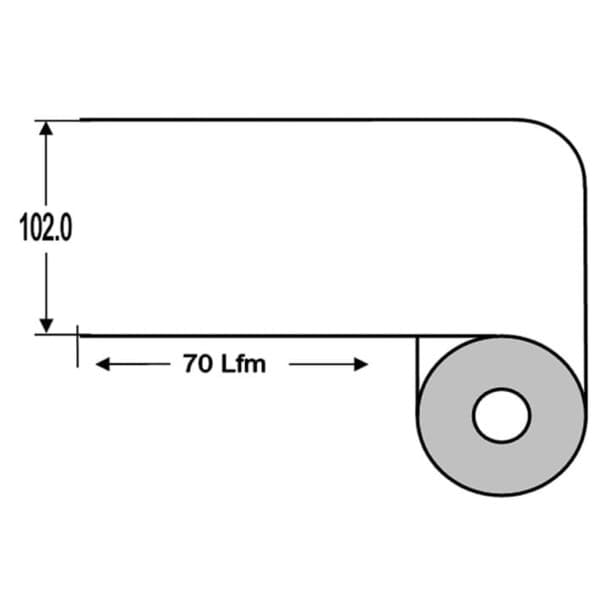
Linerless labels have no backing paper. According to Zebra, the top carries a silicone release coating so that each layer releases from the one below. The material is continuous; according to Zebra, desktop linerless printers cut the labels to length as they print. According to the shop, the effort for material, storage and transport falls by up to 40 %, and because more label material fits on a roll, you change rolls less often.
A suitable printer is a prerequisite: according to Zebra, regular thermal printers are not suitable. Linerless printers have a platen roller with a non-stick surface, and desktop models also have a special cutter. The OPAL kits are available as LiN (102 mm x 70 m, 38 mm core) for linerless label printers and as LiNMob (105 mm x 22 m, 19 mm core) for mobile linerless printers.
- Shipping labels on cardboard
- Processes in which backing paper waste is a nuisance
- Workstations where fewer roll changes save time
- Mobile labelling with linerless mobile printers (kit LiNMob)
- Printers without linerless equipment: Direct thermal labels
- Permanent marking and synthetic labels: Thermal transfer labels and ribbons
- Freezer and cryogenic storage: Freezer and cryo labels
- Asset labelling with tamper evidence: Security and asset labels
Detailed specifications
| Kit LiN | Kit LiNMob | |
|---|---|---|
| Face material | continuous direct thermal paper, white | same as left |
| Liner | none (linerless) | same as left |
| Print method | direct thermal | same as left |
| Adhesive | acrylic adhesive, permanent | permanent |
| Adhesion according to the shop | good, e.g. on cardboard | same as left |
| Width x length | 102 mm x 70 m | 105 mm x 22 m |
| Core diameter | 38 mm | 19 mm |
| Outer diameter | 100 mm | 58 mm |
| Rolls per box | 3 | 20 |
| Printers according to the shop | well-known linerless label printers | well-known mobile linerless label printers |
| Temperature range | not specified | same as left |
| Resistance | not specified | same as left |
| Article number | OPAL-LiN | OPAL-LINMOB |
Source: manufacturer data sheets and product pages, as of October 2026. Subject to change; individual variants may differ. Prices and delivery times are available in the shop.
Variants and accessories
| Kit | Use according to the shop | Roll | Core / outer diameter | Contents per box |
|---|---|---|---|---|
| LiN | linerless label printers | 102 mm x 70 m | 38 mm / 100 mm | 3 rolls |
| LiNMob | mobile linerless label printers | 105 mm x 22 m | 19 mm / 58 mm | 20 rolls |
Goes well with
- Linerless-capable printers: Label printers
- Labels with backing paper for standard printers: Direct thermal labels
- Control label lengths and layouts centrally: OPAL Labelmanagement™
- Other widths, samples and advice: Labels and consumables
Linerless or label with backing paper?
| Linerless (kit LiN) | Direct thermal with liner (kit K) | |
|---|---|---|
| Liner | none | labels on backing material |
| Format | continuous, 102 mm wide | 99 x 148 mm, perforated after each label |
| Contents per roll | 70 m | 400 labels |
| Core / outer diameter | 38 mm / 100 mm | not specified |
| Printer | linerless printers with non-stick platen only, according to Zebra | thermal printers, according to the shop incl. Zebra GK420 and GX420 |
| Print setting | usually higher print darkness according to Zebra | standard |
| Waste | no backing paper | backing paper is left over |
Linerless pays off when many labels are printed at a few stations and you are replacing or converting the printers anyway. Zebra advises testing the material extensively with the printers in use, because release coating and adhesive can build up on printhead and platen. If you keep working with existing standard printers, stay with labels on backing paper. Go to direct thermal labels
What OPAL adds
Frequently asked questions
Can I use linerless labels on my existing label printer?
Usually not. According to Zebra, regular desktop and mobile printers are not suitable because the adhesive contacts the platen roller directly. Linerless printers have a roller with a non-stick surface, and desktop models also have a special cutter.
How long is a linerless label?
The material is continuous. Your layout sets the length; according to Zebra, desktop linerless printers cut the label to size as they print. This lets you print labels of different lengths from the same roll.
What should I watch out for when introducing linerless?
Zebra recommends testing the material extensively with your own printers. According to Zebra, linerless labels usually need a higher print darkness, release coating and adhesive can build up on the printhead, and printhead and platen are wear parts. We are happy to support such tests.
How much material do I save?
According to the shop, the effort for material, storage and transport falls by up to 40 %, because the backing paper is eliminated and more label material fits on a roll. How much this is in your operation depends on format and volume.
Which roll fits my printer?
Kit LiN has a 38 mm core and an outer diameter of 100 mm, kit LiNMob a 19 mm core and an outer diameter of 58 mm. Compare these values and the width of 102 mm or 105 mm with your printer’s data sheet.
Are linerless labels available in other widths?
The shop lists the LiN and LiNMob kits. For other widths or adhesives, use the label request form or read more under Labels and consumables.
Data sheets and manufacturer information
The manufacturer provides data sheets, user guides and configuration guides on the product page. We are also happy to send you the documents directly.